To complete your application you need an active email and the following:
Identification
Have your Green ID Book or Smart Card ready in JPEG format.
Documentation
You'll need your bank statement or bank confirmation letter in PDF or JPEG format.
Photo of yourself
Use your camera or webcam to take a selfie for verification.
You will also need to provide the following details
Image
Location
Your business must be located in South Africa
Image
Policies
Your policies must be displayed on your website
Image
Monthly Turnover
We need your monthly turnover to make an informed decision
Image
Business Details
Provide your e-Commerce website URL
Image
Your Details
Customer service email address or telephone number must be visible on your business website
Image
Take A Selfie
Your picture helps us to protect you from identity fraud
Image
Banking Details
Provide your business banking details to process the application
How do you integrate with VodaPay payment gateway?
To complete your integration, first do a test integration against Vodacom's staging environment, before moving onto the production environment. Once the test integration process is complete, the staging detail will need to be substituted with the production detail.
If you require any technical support during your integration/development phase, please contact Vodacom's integration support team at the following email address: [email protected]
This section aims to provide you with a high-level integration overview as well where to find the relevant information to integrate quickly and successfully.
Whether you sell your products and services online, on social media, in-store or on the move, we can help you accept payments safely, easily and quickly.
You'll have access to a portal to manage your devices, download merchant statements and export your transaction history. Soon, you'll also be able to send receipts via email.
The VodaPay Merchant Portal allows you to view all your transactions and sales made across all our payment solutions including eCommerce, VodaPay Max and VodaPay Chop Chop.
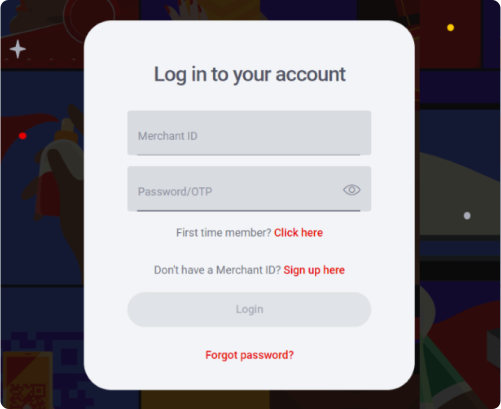
Once you have successfully been onboarded, you will receive an email with your Merchant ID, and your OTP will be sent to your cell phone number.
Enter your Merchant ID in the field labelled "Merchant ID". The Merchant ID is 15 characters long and begins with "VPS" e.g. VPS123412341234.
Enter your One-Time Password (OTP) in the field labelled "Password/OTP"
If your OTP has expired, you can retrieve a new OTP by clicking on the "first time user" link. You will then be requested to provide your Merchant ID, if you have a valid Merchant ID a new OTP will be sent to your cell phone number.
Image
Password
How to set your password
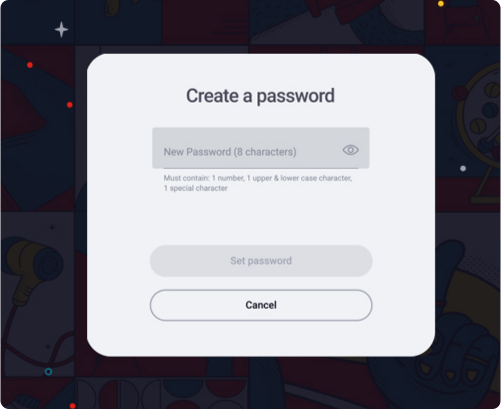
Once your Merchant ID and one-time password have been verified, you will be requested to set your new login password.
Your password should consist of at least one number, one uppercase character, one lowercase character, one special character and should have eight characters minimum. e.g. 1Aa&5678
Once your password has been set, you will be navigated to the login screen to login with your new credentials.
Image
Change password
Did you forget your password?
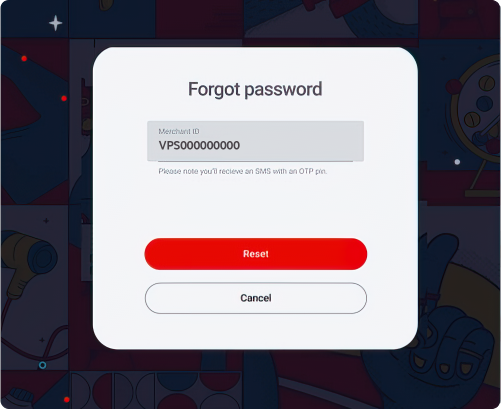
Click on the "Forgot password" link under the login button.
Enter your Merchant ID and an SMS will be sent to your number.
You'll need to enter the OTP, which will allow you to create a new password.
Your password must have eight characters. One uppercase, one lowercase and one special character must be included.
When your password is reset, login with your Merchant ID and password. You will be directed to you dashboard.
Image
Dashboard
What is on your dashboard
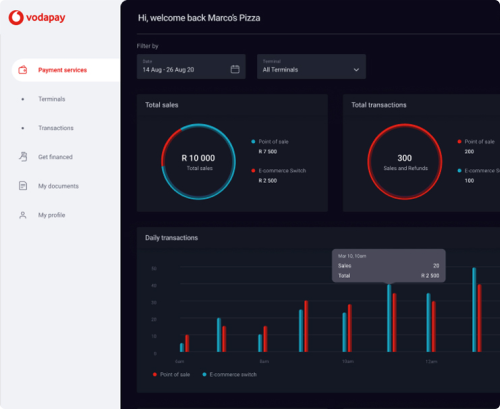
You can navigate through the portal using the menu on the left-hand side of your dashboard.
The first graph on the top left of your dashboard is your total sales. This is the total Rand value of all the income earned across your terminals and can be filtered per terminal type.
The second graph on the top right of your dashboard is your total transactions, this includes, but not limited to, card taps, card swipes, QR scans, and reversals.
Image
Transactions
Terminal Transactions
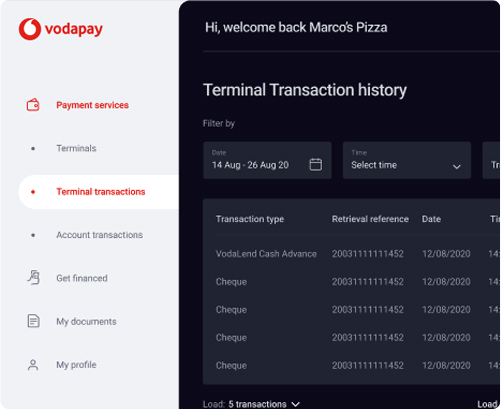
You can filter your processed transactions by date, transaction type and response codes.
If you wish to save your transaction history, you can click on the "Export" button. This will export your transaction history as a CSV.
For each date, we show you the transactions processed.
If you would like some more information on a transaction, you can click on the line item. This will open a right hand slide out menu which will give you more details on a transaction.
Image
Transactions
Account Transactions
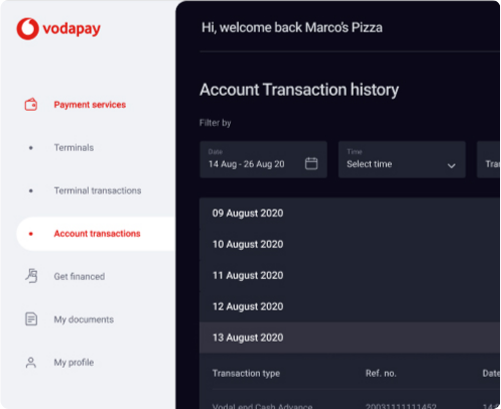
You can filter your reconciled transactions by date, transaction type and response codes.
If you wish to save your transaction history, you can click on the "Export" button. This will export your transaction history as a CSV.
For each date, we show you the total amount you earned in each settlement. You can expand these totals to view a breakdown of each settlement.
If you would like some more information on a transaction, you can click on the line item. This will open a right hand slide out menu which will give you more details on a transaction.
Coming soon, you will be able to send a receipt to an email address.
Image
Transactions
Terminal Transactions
You can filter your processed transactions by date, transaction type and response codes.
If you wish to save your transaction history, you can click on the "Export" button. This will export your transaction history as a CSV.
For each date, we show you the transactions processed.
If you would like some more information on a transaction, you can click on the line item. This will open a right hand slide out menu which will give you more details on a transaction.
Image
Finance
Get financed
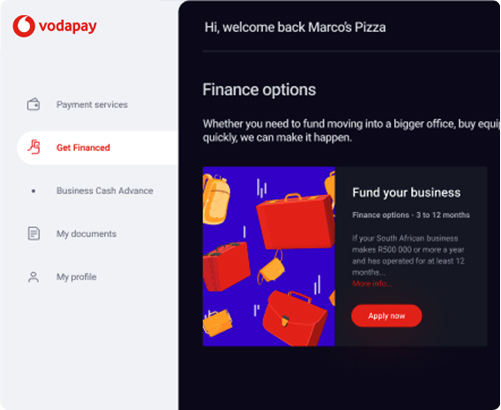
As a Vodacom Business customer, if your business is performing well, you will be able to apply for business funding. If you qualify for business funding, you can click on the "Apply Now" action. If you don't yet qualify, click on the "More Info" to find out how to qualify.
Image
Documents
My documents
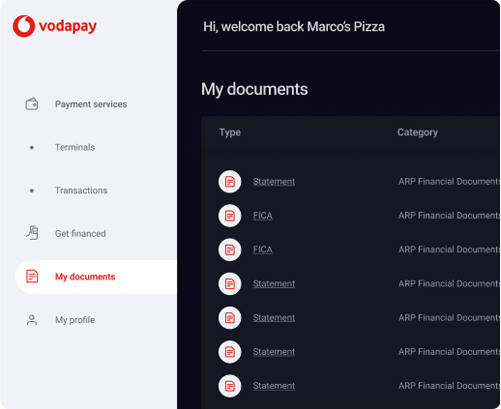
In the documents tab, you can either view or download your documents such as your monthly invoice and financial statements.
If you click on the file name, you will be able to view the selected the document. If you click on the download icon, the document will download to your device.
Image
Profile
My Profile
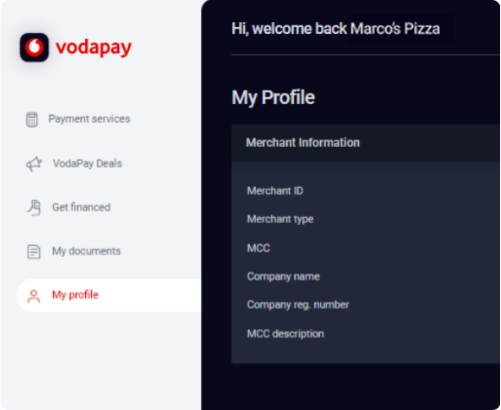
Your profile displays your business information and the option to change your password.
On your profile we display your Merchant ID, Merchant Type, Merchant Category Code and Description, Company Name, and Business Registration Number.
Image
Refund
How to process a refund
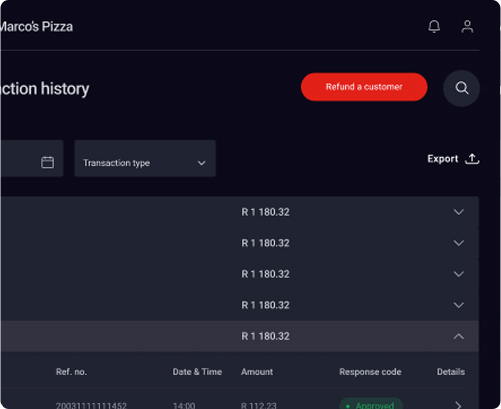
Log on to the Merchant Portal using the credentials supplied during on-boarding. From the landing page of the Merchant Portal, navigate to Account Transactions in the left menu pane.
Click "Refund a customer"
Select the transaction that you would like to refund by clicking on the arrow [>] in the details column of the transaction.
The list of transactions that meet the search criteria will be displayed.
Transactions will be available on the Merchant Portal for as long as the agreed archive date has not been reached.
Only transactions with the response code "Approved" can be refunded.
Image
Refund
Edit the refund details
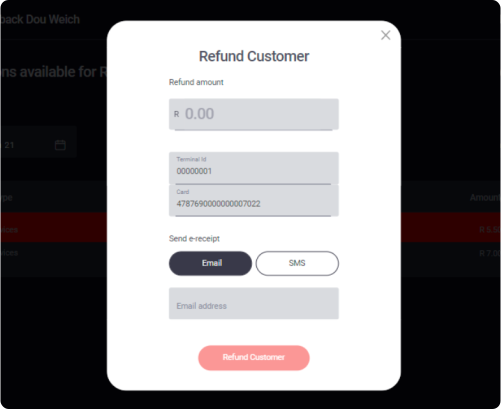
Enter the amount you would like to refund the customer.
The amount may not exceed that of the approved amount of the transaction.
Partial refunds can also be performed.
The merchant can enter an email address or cell phone number for the e-receipt to be delivered to.
How and when do I get paid?
At the end of each business day, VodaPay will perform a settlement process which considers all successful payments processed on your behalf as well as any refunds that you have performed.
On the next business day, VodaPay will calculate the amount due to you by offsetting any debits such as refunds or transaction fees, against payments received. The remaining balance is then paid into your designated clearing bank account.
A detailed view of this can be found on the Account Transactions screen of the merchant portal. Invoices for fees charged by VodaPay are available on the Documents screen on the merchant portal.
Do you need help?
To have your questions answered, please visit our FAQ section. It covers several commonly asked questions that may provide you with the answers you need. Alternatively, please contact our call centre and our friendly agents will be happy to help you.
Fees are calculated based on your monthly turnover and the payment methods you wish to accept from your customers. When a payment is successfully processed on the payment gateway, we will calculate the fee based on the transaction amount and the payment method used.
A Dispute occurs when a buyer asks their issuing bank to reverse a transaction that has already been cleared. This tends to happen mainly due to a card being used fraudulently or when a customer feels that their order was not fulfilled by the merchant. If the merchant should fail to respond to the Dispute, it will result in a Chargeback
How Chargebacks work
Step One - Dispute is raised
The process is triggered when the Cardholder logs a dispute with the Issuing Bank.
The issuing bank verifies whether the dispute is valid or invalid.
If the issuer views the dispute as invalid, the chargeback process will end at this stage.
The cardholder will be notified of the decision.
Step Two - Dispute is logged
If the dispute is determined to be valid, or at least worthy of further investigation.
The Issuing bank will assign a reason code and electronically transmit all the dispute data to the Acquiring bank.
The cardholder will be issued with a temporary credit while the dispute is being investigated.
Step Three - Dispute is transmitted to the Acquiring Bank
The dispute data is recorded and electronically transmitted to the Acquiring Bank,
SLAs for the Acquiring bank to reply are triggered.
Step Four - The Acquirer receives the dispute
When the Acquiring Bank receives the dispute, they:
Investigate the transaction details on the Card Association portal where the transactional log is stored,
The bank then logs an incident on their system in order to keep track of the SLA to reply to the Issuing bank.
Step Five - Supporting evidence is requested from Merchant
The Acquiring bank then requests the transaction re-presentment documents to be used as fulfilment of the dispute from the Merchant in writing; this request is a call-to-action for the merchant to gather and submit compelling evidence the remedy the dispute,
The request consists of the transaction details, the reason for the dispute, what documentation to provide or how to deal with the dispute and the due date for the Merchant to reply.
Step Six - When the Merchant receives the dispute, the Merchant:
Will assess the request,
Collect the transaction evidence in accordance with the request,
Submits the evidence back to the Acquiring bank.
However, if the Merchant doesn't reply to the Acquirer in time; then they lose their re-presentation rights and therefore will be debited for the full value of the dispute and in addition, the Card Association will impose a chargeback fee.
When the acquirer receives the merchant's evidence from the merchant, then they'll pass this along to the Card Association, which will be sent it to the Issuer, and then back to the Cardholder.
If you are a Vodacom merchant, your store is configured to process 3D secure authenticated card transactions. This means that all customers will need to authenticate (either OTP or in-app) their transaction for it to be processed successfully.
The only exception to this is the recurring/subscription payments functionality where the initial transaction is 3-D secure authenticated, and all subsequent transactions are non-3-D secure.
One of the critical success factors of the authentication schemes is to remove chargebacks from the system. Each of the card issuers are adding edits to ensure, wherever possible, that you are not charged back for a transaction that was authenticated.
PCI Data Security Standard or PCI DSS are the standards governing the credit card industry. The main aim of these standards is to create a safe environment for credit card transactions and minimize the risk of financial fraud.
Vodacom adheres to international PCI (payment card industry) compliance standards for data security for the credit card data handled by Vodacom. All internal processes strictly adhere to the PCI-DSS level 1 certification.
The VodaPay Gateway Provider-Channel (PSP-Channel) is primarily a reach solution. It aggregates both card present transactions originating from merchant systems and card-not-present transactions such as e-commerce.
For card-present transactions, it supports integrated Points of Sale, self-service devices and terminal systems. For card-not-present transactions, it accepts input from payment channels such as mobile and online purchases. A web-based commerce portal with 3-D Secure, instant EFT and QR code payment options is part of the solution.
The VodaPay Gateway API is an integration point into the PSP-Channel solution, enabling front-end mobile commerce and e-commerce applications to introduce transactions directly into the system's transaction processing flow.
AWS Service Delivery- Amazon EC2 for Microsoft Windows
Business enterprises leveraging Microsoft Workloads are increasingly considering a shift to Amazon EC2 for Windows, lured by the promises of enhanced agility, robust performance, advanced security, and potential cost reductions. But the transformation from an on-premises Windows application setup to a cloud-based paradigm can appear challenging, and is fraught with vital migration choices pertaining to design and configuration.
Being an AWS collaborator, Vodacom boasts extensive domain expertise coupled with practical familiarity with Amazon EC2 for Microsoft Windows Server and related databases. Vodacom aids you in designing, structuring, transitioning, and administrating your Amazon EC2 workloads dedicated to Microsoft Windows Server, ensuring maximised agility, impenetrable security, and optimal cost efficiency. We are committed to amplifying the reliability and performance of your essential Windows infrastructure on AWS, all while ensuring a seamless and minimally disruptive migration experience.
Benefits with Vodacom
Seamless Transition
Migrate Windows workloads to AWS without unplanned disruptions, facilitating quicker deployments and boosting developer efficiency.
Enhanced Security
Benefit from advanced security, compliance, and governance capabilities exclusive to AWS.
Superior Performance
Harness the might of Amazon EC2 instances that promise 3x amplified throughput and a reduction of latency by 25%.
Cost-effective Ownership
Experience reduced ownership costs through tailored pricing structures and versatile Microsoft licensing alternatives on the cloud.
Key Features of EC2 for Microsoft Windows with Vodacom
Image
Customised Licensing
____
With Windows on AWS and Vodacom's guidance, utilise your existing licenses for migration, ensuring a financially savvy licensing approach. Harness AWS License Manager to monitor software license usage and mitigate non-compliance risks.
Image
Optimised Windows Workloads
____
With Vodacom and AWS, get access to myriad services that offer insights and management tools for your AWS usage, ensuring cost optimization. Further, leverage AWS's open-source utilities to significantly lower your commercial licensing expenditures.
Trust Vodacom's rich legacy and AWS expertise to streamline your Windows workloads' journey to the cloud.
Image
Modernise Applications
____
Vodacom and AWS provide an extensive array of .NET, container, and serverless solutions, empowering you to contemporize your Windows workloads. This collaboration simplifies the process, reduces unpredictability, and minimizes the financial strain of cloud migration.
Explore Vodacom's expertise in migrating Windows workloads to Amazon EC2. Boost agility, security, and performance with our trusted solutions.
Page Title
Vodacom AWS Competencies: Amazon EC2 for Microsoft Windows Migration
Keywords
Vodacom AWS Competencies, Amazon EC2 for Microsoft Windows, Windows workloads migration, Database Evolution with Aurora, Application Modernization, AWS License Manager